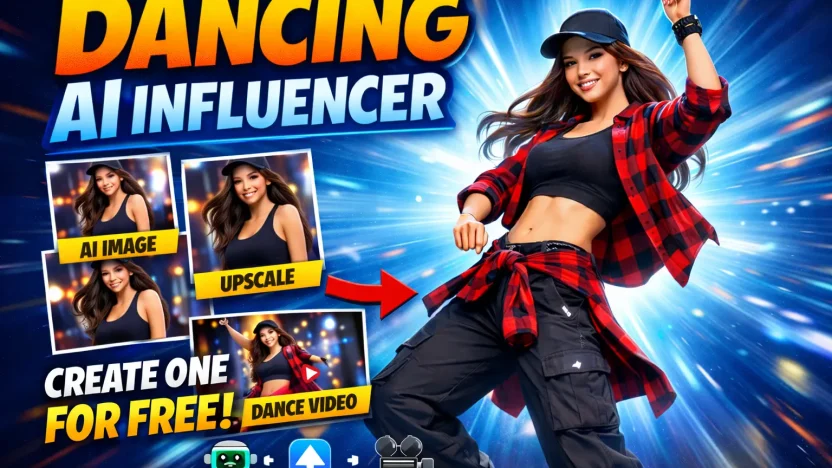
A Dancing AI Influencer is no longer a futuristic concept. With the right free AI tools, you can create a realistic digital persona, upscale the image to professional quality, and turn it into a high quality dance video.
In this guide, you will learn how to build your own Dancing AI Influencer step by step using free tools for image creation, upscaling, video generation, and video enhancement.
Step 1: Create Your AI Influencer Image
The foundation of any Dancing AI Influencer is a strong character image.
You can use ChatGPT or Gemini to generate detailed prompts for AI image generators. Both tools are excellent for refining character descriptions and crafting prompts that include:
• Facial features
• Hairstyle and outfit
• Lighting and camera angle
• Mood and niche
• Social media style
Example prompt structure:
“Ultra realistic female influencer, street dance outfit, cinematic lighting, 4K portrait, shallow depth of field, confident pose, social media aesthetic.”
Use your preferred free AI image generator and test several variations. The more specific your prompt, the more professional your result will look.
Your goal is to create a base character that feels consistent and brand ready.
Step 2: Upscale the Image for Professional Quality
Once your image is generated, it may not be high resolution enough for video creation.
To fix this, use https://imgupscaler.com.
This free tool enhances image resolution, sharpens facial features, improves texture quality, and removes softness that often appears in AI generated images.
Upload your chosen image and upscale it to a higher resolution. This step makes your Dancing AI Influencer look far more realistic and production ready.
High quality input leads to better video output.
Step 3: Turn the Image into a Dancing Video
Now it is time to animate your character.
Go to https://www.byteplus.com/en/ai-playground/media.
Upload your upscaled image and choose a dance or motion preset. You can also use ChatGPT or Gemini to generate short dance captions, voice scripts, or performance concepts to guide the animation.
For example, you could prompt:
“Create a smooth, high-energy vertical TikTok-style dance video using the two provided frames as the character reference.
Subject: Female influencer, confident, stylish, expressive face, natural skin tones, realistic body proportions.
Style: Ultra realistic, social media aesthetic, cinematic but optimized for TikTok.
Aspect Ratio: 9:16 vertical.
Duration: 5 to 8 seconds.
FPS: 24 or 30 fps.Music Context:
The influencer is dancing to a trendy viral TikTok pop track with a strong beat drop and rhythmic bass. The choreography should sync tightly with the beat, especially head pops, hip movements, and hand gestures.Motion Direction:
Start from Frame 1 pose.
On first beat drop, transition smoothly into energetic hip sway and shoulder bounce.
Add confident hand waves, hair flip, slight body rolls.
Mid clip, incorporate quick foot shuffle and subtle spin.
End in a strong, charismatic finishing pose inspired by Frame 2.Camera Movement:
Handheld social media vibe.
Slight push-in during beat drop.
Micro camera shake synced with bass.
Subtle dynamic parallax effect for realism.Facial Expression:
Playful, confident smile.
Occasional lip sync movement.
Engaging eye contact with camera.Lighting:
Bright influencer-style lighting.
Soft highlights on hair and face.
Natural skin glow.
No harsh shadows.Clothing and Body Physics:
Clothes react naturally to motion.
Hair moves fluidly with head movement.
Realistic physics, no distortions.Energy:
Fun, viral, scroll-stopping.
Confident, trendy, Gen-Z aesthetic.End Frame:
Freeze briefly on a strong pose with confident eye contact and slight smile.”
Generate the video and let the AI transform your still image into a moving Dancing AI Influencer.
Step 4: Upscale the Video for Maximum Quality
If you want to enhance the final result even further, use https://free.upscaler.video.
This free video upscaler improves clarity, sharpens movement details, and increases resolution. It is especially helpful if you plan to upload to platforms that favor high definition content.
Upload your generated dance video and upscale it for a cleaner, more professional finish.
Why This Works
The reason a Dancing AI Influencer performs well online is simple. Movement captures attention. Dance content performs extremely well on social media platforms, and AI allows you to produce content consistently without filming yourself.
By combining:
• ChatGPT or Gemini for prompt creation
• imgupscaler.com for image enhancement
• BytePlus AI Playground for video generation
• free.upscaler.video for final video enhancement
You create a complete free workflow from concept to polished video.
Final Thoughts
Creating a Dancing AI Influencer is now accessible to anyone. With the right prompts, clean upscaling, and smart video generation, you can produce high quality AI dance content without expensive software or production teams.
Start experimenting, refine your prompts, test different dance styles, and focus on building a consistent digital persona.
Your AI influencer is only a few clicks away.